Balance Game Laser Cut Balancing Toy: A Practical Tool for Creative and Educational Workflows
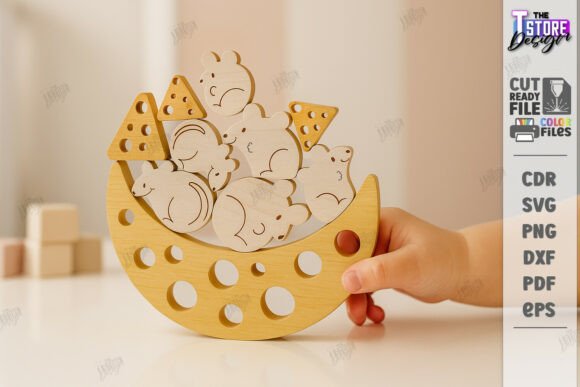
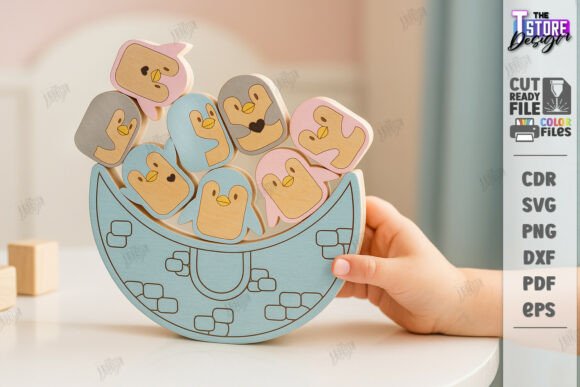
The Balance Game Laser Cut Balancing Toy is more than just a playful object—it’s a precision-crafted wooden balancing game designed for laser cutting machines. With its nature-themed design and counterbalance mechanics, this toy serves as both a hands-on educational tool and a creative resource for makers, educators, and small business owners. Whether you're building a product line, designing a learning activity, or integrating tactile elements into your creative process, this laser cut balancing toy offers a unique blend of functionality and aesthetic appeal.
At its core, the Balance Game Laser Cut Balancing Toy is a stacking game that challenges users to maintain equilibrium using wooden pieces of varying shapes and sizes. The design files included—SVG, EPS, PNG, PDF, and DXF—make it compatible with a wide range of laser cutting machines and software platforms. This flexibility allows creators to incorporate the toy into different production workflows, from small-scale personal projects to commercial manufacturing runs.
Integrating the Balance Game into Your Laser Cutting Workflow
Before diving into production, it’s important to understand how the Balance Game Laser Cut Balancing Toy fits into a broader laser cutting workflow. The digital package includes all necessary file formats, but users should be aware of software compatibility, especially when working with Lightburn. For optimal dimensional accuracy, the DXF format is recommended over SVG, which can sometimes cause distortion in certain setups.
When preparing your laser cutter, consider the following steps:
- File selection: Choose the DXF format for precise cutting, especially if you're using Lightburn or similar software.
- Material testing: Run a small test cut on scrap material to confirm alignment, depth, and engraving quality.
- Layer management: Separate the red (cut) and black (engrave) layers to ensure clarity and precision during the laser process.
These steps help maintain consistency and reduce errors, especially when scaling production or integrating the toy into a larger product line.
Applications Across Creative and Educational Contexts
The Balance Game Laser Cut Balancing Toy is versatile enough to be used in a variety of settings. Here are a few practical applications:
Educational Use
For educators and curriculum designers, this balancing toy can be a hands-on tool to teach physics concepts like center of gravity, equilibrium, and force distribution. It can be incorporated into STEM or STEAM lessons, especially for younger students or maker-based learning environments. Teachers can laser cut multiple sets for classroom use, ensuring durability and reusability.
Creative Product Development
Entrepreneurs and small business owners can integrate this design into their product offerings. Whether selling wooden toys, creating custom educational kits, or offering personalized gifts, the Balance Game Laser Cut Balancing Toy provides a ready-to-use template that can be branded, customized, or combined with other laser-cut designs.
Therapeutic and Cognitive Engagement
The toy also serves as a tactile, calming activity that supports focus and motor skills. Occupational therapists, mindfulness coaches, and productivity consultants may find value in using this tool to encourage deliberate, hands-on engagement that supports mental clarity and fine motor development.
Optimizing Usability and Long-Term Integration
To ensure smooth integration into your workflow, consider the following best practices:
- Batch production: If you plan to produce multiple units, organize your laser cutting layout to maximize material usage and minimize waste.
- Quality control: After cutting, inspect each piece for consistency in shape and engraving detail. This helps maintain the toy’s visual appeal and functional balance.
- Storage and organization: Keep the finished pieces in labeled compartments or kits to streamline packaging, distribution, or classroom use.
By treating the Balance Game Laser Cut Balancing Toy as part of a larger system—whether for education, product creation, or therapeutic use—you can maximize its utility and long-term value.
Customization and File Flexibility
One of the strengths of this digital product is its adaptability. While the standard file set includes SVG, EPS, PNG, PDF, and DXF formats, users can request alternative versions or variations. For example, if you need a higher-resolution PNG or a different color scheme for engraving, reaching out to the creator can help tailor the files to your specific needs.
Customization options also extend to branding and design. You can add logos, labels, or instructional text to the pieces before cutting, allowing the toy to serve as a branded giveaway, educational aid, or retail product. Just be sure any added design elements don’t interfere with the toy’s balance mechanics or laser cutting accuracy.
Ensuring Compatibility and Technical Success
As with any laser cutting project, success depends on compatibility between your machine, software, and file format. The Balance Game Laser Cut Balancing Toy is designed to work across platforms, but some adjustments may be necessary depending on your setup.
Here are a few technical considerations:
- Software calibration: Before cutting, verify that your laser software correctly interprets the file dimensions. This is especially important when using SVG files in Lightburn.
- Layer settings: Assign the correct power and speed settings for red (cut) and black (engrave) layers to ensure clean results.
- Material thickness: Adjust your machine settings based on the thickness of your material, whether it’s 3mm plywood, acrylic, or MDF.
These small but critical steps help ensure that your final product functions as intended and maintains its visual appeal.
Conclusion: A Thoughtfully Designed Tool for Real-World Use
The Balance Game Laser Cut Balancing Toy is a well-structured digital asset that bridges the gap between creativity, education, and practical production. Whether you're an educator building a hands-on lesson, a small business owner expanding your product line, or a maker exploring new laser cutting projects, this toy offers a ready-to-use, customizable solution that integrates smoothly into your workflow.
By focusing on compatibility, usability, and customization, you can ensure that the Balance Game Laser Cut Balancing Toy becomes a reliable and repeatable part of your creative or business process. And if you have questions or need additional file types, don’t hesitate to reach out to the creator—support and flexibility are key to making the most of this digital design.