Game Controller Name Sign SVG Cut File: Personalized Craft Projects Made Simple
For makers, hobbyists, and small business owners in the custom décor space, the Game Controller Name Sign SVG Cut File offers a unique and modern way to create personalized wall or door signs. This digital design file, optimized for laser cutting and compatible with CNC routers and other craft machines, brings together creativity and technology in a seamless workflow. Whether you're crafting for personal use or preparing items for sale, this SVG file provides a professional template that can be customized with any name, making it a versatile asset for your creative toolkit.
What Is a Game Controller Name Sign SVG Cut File?
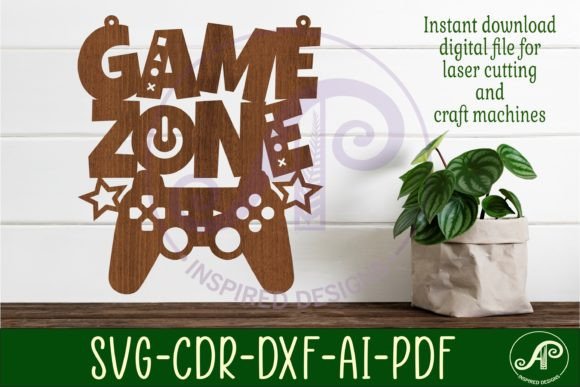
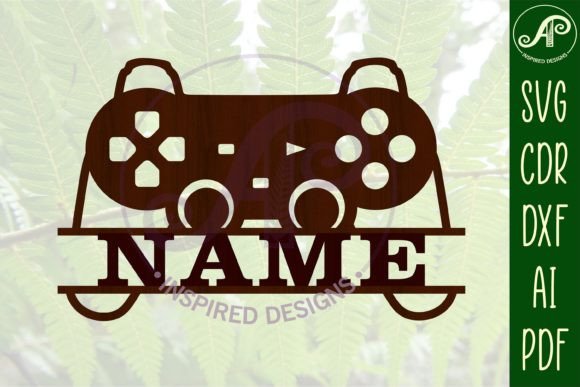
The Game Controller Name Sign SVG Cut File is a digital design shaped like a retro-style game controller, with a designated area for adding a name. It's intended for laser cutting or engraving on materials like wood, acrylic, or MDF. The file includes exterior cut lines in blue, which help users easily distinguish between engraving and cutting paths in software like LightBurn or Cricut Design Space. It comes in multiple formats—SVG, DXF, AI, CDR, and PDF—ensuring compatibility with a wide range of design and cutting software, including CorelDRAW and Adobe Illustrator.
Users can adjust the size of the design to suit their project needs, and the name section can be edited using any all-caps font, with Clarendon BT used as the example in the preview image. Before cutting, the name must be linked to the design in the editing software, ensuring a clean and integrated final product.
Why This Design Resonates With Modern Makers
In today's DIY and maker culture, personalization is key. Consumers are increasingly drawn to custom, handcrafted items that reflect their individuality. The Game Controller Name Sign SVG Cut File taps into this trend by offering a playful, tech-inspired design that appeals to both kids and adults. Whether it's used as a bedroom door sign, gaming room decor, or a personalized gift, this design bridges the gap between nostalgia and modern craftsmanship.
Moreover, the rise of home-based businesses and online marketplaces like Etsy has made digital design files more valuable than ever. Creators can purchase the file once, use it across multiple projects, and scale their output without compromising quality. This efficiency is especially important for entrepreneurs looking to streamline production while maintaining a personal touch.
How to Use the Game Controller Name Sign SVG Cut File Effectively
Using this digital download requires a few simple steps, but the results can be striking. Here’s a practical workflow:
- Download and extract the ZIP folder containing the SVG, DXF, AI, CDR, and PDF files.
- Import the SVG file into your preferred laser cutting software (e.g., LightBurn).
- Ungroup the design elements to edit the name section.
- Add the desired name using an all-caps font (Clarendon BT is recommended but not required).
- Link or weld the text to the controller shape to ensure it cuts cleanly.
- Adjust the size as needed for your material and space.
- Send to your laser machine or CNC router for cutting or engraving.
This process is straightforward for those with basic design software skills and can be mastered quickly by beginners. Since the file is vector-based, resizing doesn’t affect the quality, allowing for flexibility in both small and large-scale projects.
Practical Applications Across Different Audiences
The versatility of the Game Controller Name Sign SVG Cut File makes it useful for a wide range of users:
- Hobbyists can create custom signs for family members or friends, adding a personal and playful touch to home décor.
- Small business owners can incorporate this design into their product lineup, offering game-themed name signs as part of a broader collection of personalized items.
- Educators may use the file in classroom settings to teach students about digital design, laser cutting, and vector graphics.
- Entrepreneurs can integrate the design into subscription boxes, party kits, or seasonal promotions, especially around gaming or tech-themed events.
For example, a small shop on Etsy might bundle the controller sign with other gaming-themed SVG files—like joystick or arcade button designs—to create themed kits for gaming enthusiasts. Similarly, a woodworker looking to expand into laser-engraved items can use this file to add a modern edge to their offerings without needing to start from scratch.
Why SVG Files Are Gaining Popularity in Digital Crafting
SVG (Scalable Vector Graphics) files have become the standard in digital crafting due to their flexibility and compatibility. Unlike raster images, SVGs are resolution-independent, meaning they retain clarity at any size. This is especially important for laser cutting, where precision is crucial. The Game Controller Name Sign SVG Cut File exemplifies how SVGs are empowering makers to produce high-quality, scalable designs without the need for advanced graphic design skills.
Additionally, the inclusion of multiple file formats (DXF, AI, CDR, and PDF) ensures that users are not limited by software preferences. Whether you're a CorelDRAW veteran or a newcomer using free laser software, the file adapts to your workflow. This cross-platform compatibility is a major factor in the growing popularity of digital design downloads.
Addressing Common Challenges and Tips for Success
While the Game Controller Name Sign SVG Cut File is user-friendly, there are a few common issues to be aware of:
- Text alignment: Ensure the name is centered and properly scaled within the controller shape to avoid cutting errors.
- Layer management: Keep the exterior cut lines in blue separate from engraving layers to avoid confusion during setup.
- Font choice: While Clarendon BT is used in the preview, any bold all-caps font will work. Test different fonts to find one that best suits your style and material.
- Software compatibility: Always check that your design software supports the file format you're using, especially when switching between SVG, DXF, and CDR.
By addressing these small but critical details, users can ensure a smooth cutting process and a polished final product. Taking time to preview the design in your software before sending it to the machine can prevent costly mistakes and wasted materials.
Looking Ahead: The Future of Digital Design Files in Crafting
As technology continues to evolve, so do the tools and methods available to creators. Digital design files like the Game Controller Name Sign SVG Cut File represent a growing trend where digital assets empower physical creation. With the increasing accessibility of laser cutters, Cricut machines, and affordable design software, more people are entering the world of personalized crafting than ever before.
In the coming years, we can expect to see even more integration between digital design platforms and physical tools. Cloud-based design tools, AI-assisted layout adjustments, and real-time previews for laser cutting are already beginning to emerge. For creators, this means faster production times, greater customization, and more opportunities to innovate within the personalization space.
Whether you're a seasoned maker or just starting out, the Game Controller Name Sign SVG Cut File is more than just a design template—it's a gateway to exploring the intersection of creativity and technology. By embracing digital tools like this, crafters can continue to push the boundaries of what’s possible in personalized design.