3D Chess Board Laser Cut File Guide
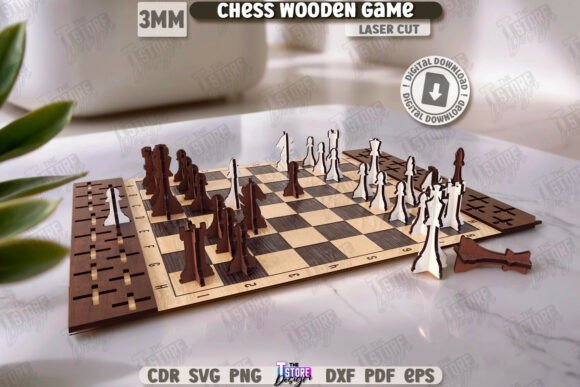
Creating a custom chess set is a rewarding project that blends strategy, craftsmanship, and modern technology. The 3D Chess Board Laser Cut File offers a sophisticated solution for makers who want to build a stunning, multi-layered board without starting from scratch. Unlike traditional flat boards, this design utilizes a stacked architecture to create depth and visual interest. It is specifically engineered for use with laser cutters like Glowforge, CNC routers, and other precision cutting machines.
This digital template transforms simple sheets of material into a complex, three-dimensional object. By layering different materials and thicknesses, you can achieve a professional finish that rivals store-bought sets while maintaining the unique character of a handmade item. Whether you are a hobbyist looking for your next weekend project or a small business owner seeking a new product line, understanding how to utilize these files is the first step toward creating something exceptional.
Understanding the Multilayer Design Concept
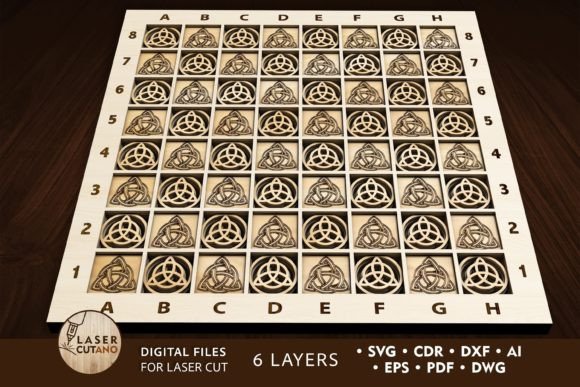
The core appeal of this CHESS BOARD Laser Cut File Glowforge Svg lies in its multilayer layout. The design consists of six distinct layers that stack together to form the final structure. This approach allows for intricate details that would be difficult to carve out of a single block of wood or acrylic. Each layer serves a specific purpose, contributing to the overall stability and aesthetic of the board.
A unique feature of this template is the requirement for the first layer to be made from glass or a transparent material like clear acrylic or Plexiglas. This creates a striking visual effect where the underlying layers appear to float beneath a glass surface. When combined with the engraving elements included in the design, the result is a board that looks both modern and timeless. The transparency adds a sense of lightness to the heavy game pieces, making it an eye-catching centerpiece for any room.
The digital files provided are versatile and compatible with various software formats. After purchase, you receive a .zip file containing versions in .AI, .SVG, .DXF, .DWG, .CDR, .EPS, and .PDF. This ensures that whether you are using Adobe Illustrator, CorelDRAW, or specific machine software, you will have the correct vector data to drive your equipment. Remember to unzip the folder before attempting to open the files to ensure all paths and layers remain intact.
Material Selection and Thickness Guidelines
Choosing the right material is crucial for the success of your cnc chess project. The design is optimized for a variety of substrates, including plywood, MDF, acrylic, Plexiglas, and even metal. For wood-based projects, the recommended thickness ranges from 3 mm to 5 mm (approximately 1/8 inch to 1/4 inch). This thickness provides enough structural integrity for the layers to hold their shape while remaining manageable for most desktop laser cutters and CNC machines.
If you decide to work with acrylic or Plexiglas, the same thickness guidelines generally apply, though you may need to adjust your cutting speed and power settings based on the specific brand and color of the plastic. Metal users should note that while the design supports metal, the cutting process requires a more powerful laser or a specialized CNC router capable of handling harder materials. Always test your settings on a scrap piece of material before cutting the final layers.
The finished product measures 14 x 14 inches, which is a standard size comfortable for play. However, one of the greatest advantages of digital files is scalability. You can increase the size of the design to create a larger, more imposing board. Be cautious when reducing the size; thin elements within the engraving or the layer cuts may become too fragile if scaled down too significantly. Maintaining the proportions ensures that the glue joints remain strong and the engraved details stay legible.
Assembly and Construction Techniques
Once your layers are cut, the assembly process brings the design to life. Each layer of the multilayer model must be glued together precisely. Start by organizing your cut pieces according to the layer order specified in the design files. Clean any dust or residue from the cut edges to ensure a strong bond between layers. Using a high-quality wood glue or epoxy suitable for your chosen material is essential for long-term durability.
For the transparent first layer, handle the glass or clear acrylic with care to avoid fingerprints or scratches. Apply adhesive sparingly around the edges to prevent seepage onto the visible surface. Clamping the layers together while the glue dries will help maintain alignment and prevent shifting. If you are using a CNC router, you might also consider adding mechanical fasteners or dowels for extra reinforcement, especially if the board will be moved frequently.
The engraving elements add another dimension to the assembly. These details often serve as guides for placing the chess pieces or simply enhance the decorative appeal. Ensure that your engraving settings are calibrated correctly so that the lines are crisp but not so deep that they compromise the structural integrity of the layer. A well-executed engrave can highlight the contrast between different materials, such as dark wood against a light background or black acrylic against clear layers.
Practical Applications and Creative Uses
Beyond being a functional game board, this 3D Chess Board Laser Cut File opens up numerous creative possibilities. For educators, it serves as an excellent tool for teaching geometry, engineering, and design principles. Students can learn about vectors, layering, and material properties while building a tangible object. In a classroom setting, the process of designing and assembling the board can be broken down into manageable lessons that cover everything from software usage to physical construction.
Small business owners and entrepreneurs can leverage this design to create a unique product line. Custom chess sets make popular gifts for weddings, corporate events, and holidays. By offering customization options—such as changing the wood species, adding names to the engraving, or altering the color of the acrylic—you can differentiate your products in a crowded market. The ability to produce high-quality items quickly with a laser cutter makes this a viable option for side hustles or full-scale manufacturing.
Hobbyists and DIY enthusiasts will find satisfaction in the challenge of bringing a digital file to life. The project is accessible to beginners who are willing to learn the basics of laser cutting, yet it offers enough complexity to keep advanced users engaged. You can experiment with different material combinations, such as pairing walnut wood with red acrylic, to create a signature look. Sharing your finished projects online can also inspire others and build a community around your craft.
Key Considerations Before You Start
Before diving into your project, there are a few important factors to consider. First, ensure that your cutting machine has the necessary bed size to accommodate the 14 x 14 inch design. If your machine is smaller, you will need to cut the board in sections and join them later, which adds complexity to the assembly. Second, check the compatibility of your software with the provided file formats. While most modern design programs support SVG and DXF, having the source AI or CDR files gives you maximum flexibility for editing.
Safety is also paramount when working with laser cutters and CNC routers. Always wear appropriate protective gear, such as safety glasses and respiratory masks, especially when cutting materials like MDF or acrylic that can produce fumes. Proper ventilation is essential to remove hazardous particles from your workspace. Additionally, take the time to calibrate your machine and test your settings to avoid wasting expensive materials on failed cuts.
Finally, think about the end-user experience. If you are making this board for yourself, consider how you will store and transport it. If it is a gift, packaging becomes just as important as the product itself. A well-crafted box that protects the delicate layers during shipping can elevate the perceived value of your creation. By paying attention to these details, you ensure that your CHESS BOARD Digital multilayer layout files result in a product that is not only beautiful but also practical and durable.